
Feint GPS Simulator
A Mac-controlled toolkit for Android and iOS: mirror and control devices live, plan multi-stop GPS routes, and drive realistic location data to real devices, simulators, and emulators in real time—no root required.
Free to download with a 14-day full trial, then a permanently free tier—or unlock everything with a paid license.
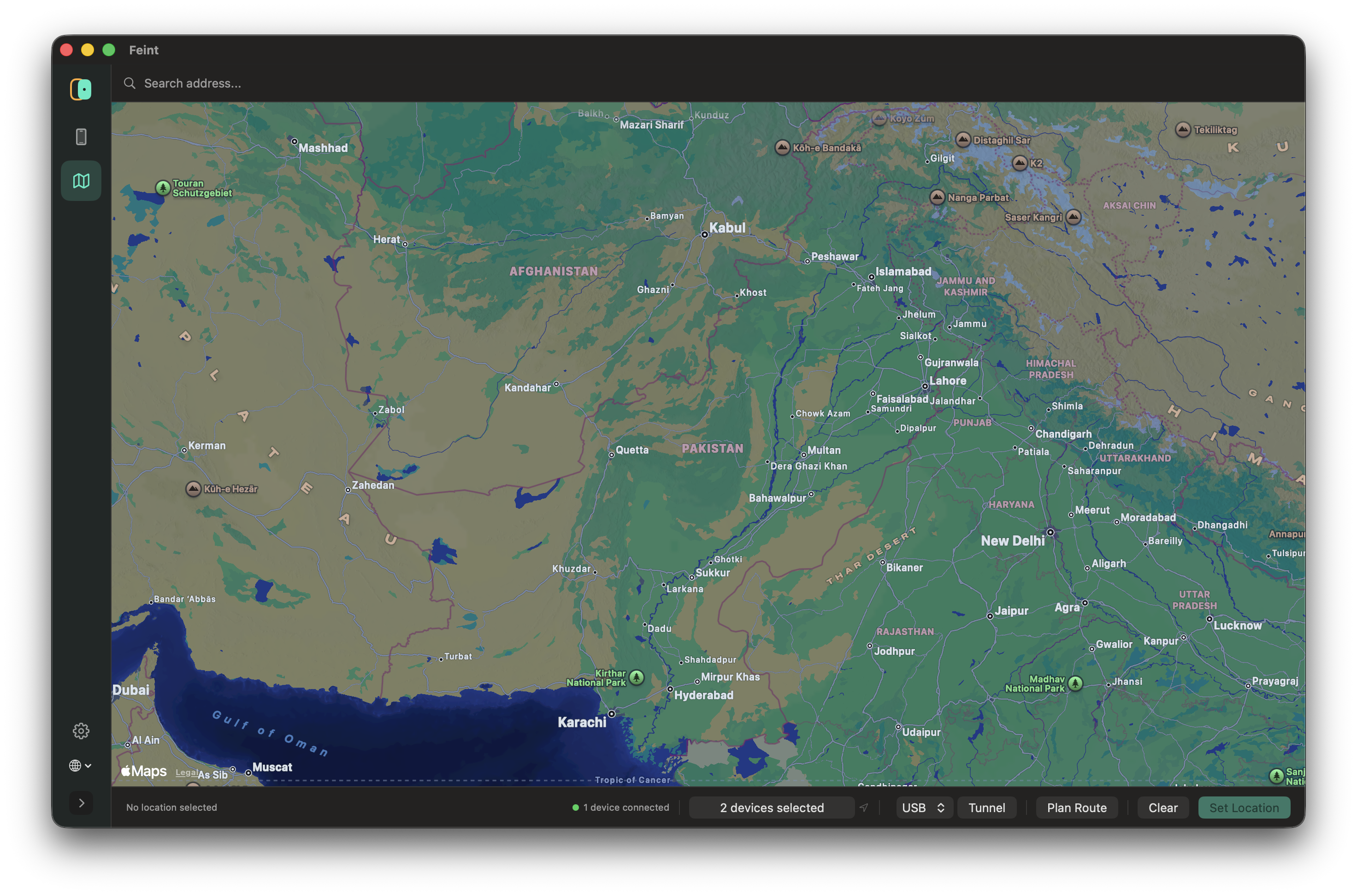
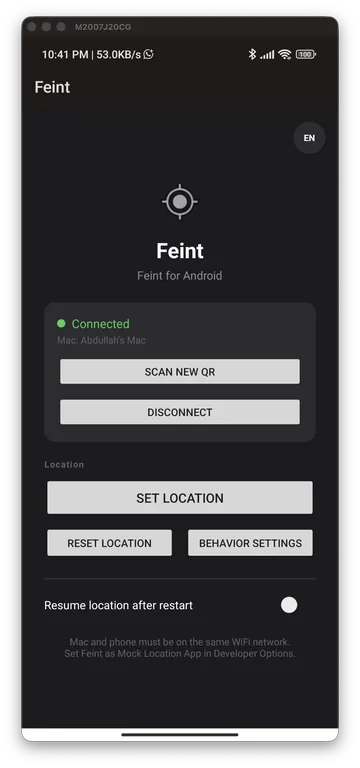
How It Works
The short version, before the full feature breakdown below.
Connect
Install Feint on your Mac, then connect your Android or iOS device — over USB or wirelessly, no cables required once paired.
Set a location
Pick a spot on the map, or plan a multi-stop route with realistic turns, speed, and timing.
Device reports it
Your device reports that location to every app on it — maps, games, delivery apps, anything that reads GPS — exactly as if you were really there.
Mirror (optional)
Optionally mirror your phone's screen right on your Mac while you do it, so you can see and control the device without picking it up.
Works with real devices and simulators/emulators. Android needs Developer Options enabled; iOS works either through a companion app or directly via Apple's own developer tools — no jailbreak required either way.
Core Capabilities
Everything developers and QA engineers need to test location-aware features—from simple coordinate mocks to automated, cross-platform route playback.
Location Setting
- Tap-to-set on map (Apple Maps on Mac, OpenStreetMap on Android)
- Exact coordinate entry (manual lat/lng)
- Address/place search — provider-selectable: free by default (Apple on Mac, on-device Geocoder on Android), or your own Google Places / Mapbox key
- Favorites — save, select, delete — independent lists on Mac and Android
- History — auto-logged, independent on each platform
- One-click Clear/Reset back to real GPS
- Multi-device fan-out — set the same location on multiple connected devices simultaneously in one action
- Works across iOS physical devices, iOS Simulator, Android physical devices, and Android emulators — one unified interface for all four
Route Planning
- Multi-stop route builder — click the map or type coordinates, unlimited stops, drag to reposition, reorder or delete any stop
- Real road-snapped routing — free by default (OSM-based), or bring your own Google Directions / Mapbox key
- Save routes and reload them later; full route run history
- Per-route overrides for vehicle type, speed, and playback style — independently overridable, falling back to device defaults when unset
- Two playback modes: constant speed, or realistic mode that automatically slows for sharp turns
- Live position tracking on the Mac map while a route plays (Android)
- Cross-platform playback — the same planned route can drive Android (via the companion app), iOS Simulator (native multi-waypoint interpolation), and real iPhones (GPX-based playback over a device tunnel) — no iPhone app install required at all
- Send one route to multiple devices across both platforms at once
Movement & Behavior Simulation
- Random GPS jitter (configurable radius) to mimic real-world drift instead of a static fix
- Configurable update interval
- Mock accuracy and altitude
- Vehicle type + speed profiles
- Device-wide defaults, overridable per-route
Bring-Your-Own API Keys
- Optional Google Maps and/or Mapbox integration, configured per feature (Routing, Map Matching, Places/Search) independently
- Live indicator showing exactly which provider is active for each feature
- Zero-cost by default — nothing requires a key or account unless you choose to add one
Automation & Developer Tools
- ADB shell broadcast commands — set/clear location from the command line, no Mac connection needed
- Tasker / MacroDroid integration via the same broadcast-intent mechanism
- Resume last location automatically after a device restart
Pairing & Connectivity
- QR code pairing
- Automatic Mac discovery over mDNS/Bonjour — zero manual configuration
- USB or wireless (Wi-Fi) connection modes
- Reconnect instantly to previously-paired devices
- Control multiple Android and iOS devices simultaneously in one session
- Live connection status indicator
Screen Mirroring
- USB mirroring for Android with full mouse/keyboard control
- USB mirroring for iPhone (view-only)
- Wireless mirroring over AirPlay with a custom low-latency decode pipeline — noticeably smoother than typical AirPlay-receiver software, since it bypasses the usual general-purpose render path
- Adjustable quality, resolution, and frame rate
- Always-on-top mirror window option
Localization
- 12 languages on both apps: English, German, Spanish, French, Japanese, Simplified & Traditional Chinese, Portuguese (Brazil), Russian, Arabic, Hindi, Urdu
- In-app language switcher on both platforms — no need to change your system language
- Applies instantly on Android; Mac applies on next relaunch
Reliability
- Crash reporting on both apps (Firebase Crashlytics)
- In-app update notifications on the Mac app
- Connection watchdog — automatically stops mocking if the Mac connection drops for too long, so a device can't get stuck faking its location indefinitely
Pricing
Every download includes a 14-day full trial. After that, keep using the free tier indefinitely, or unlock the full feature set with a paid license below.
Screen Mirroring
Watch and control your devices live from your Mac
- Full-quality USB & wireless mirroring
- Android mouse & keyboard control
- Always-on-top mirror window
- Wireless AirPlay mirroring for iPhone
GPS & Route Simulator
Simulate location and realistic movement on real devices
- Unlimited route stops & distance
- Realistic playback — turns, dwell time, jitter
- Bring your own Google/Mapbox API key
- CSV import for long routes
Full Access
Everything Feint does, one license
- Everything in Screen Mirroring
- Everything in GPS & Route Simulator
- One key for both, no juggling
You'll land on checkout for the billing cycle selected above.
FAQ
Do I need to buy all three tiers?
No. Screen Mirroring and GPS & Route Simulator can each be bought separately, and owning both together gives you everything Full Access gives you — the bundle is just a convenience if you know you want everything from the start.
Can I use one license key on more than one device?
Each key activates on one device at a time. Moving to a new device is free and instant — just deactivate on the old device first in Settings, then activate on the new one.
What if my device is lost or I forgot to deactivate before wiping it?
Email privacy@thedevstools.com with your purchase email and we'll free up the activation manually.
What happens after my 14-day trial ends?
Feint keeps working — you drop to a free tier with reduced mirror quality and shorter routes, not a hard lock. Upgrade any time.
Does this require jailbreak or root?
No, on either platform.
Is my location data or API key sent anywhere?
Google Maps/Mapbox keys, if you add them, are stored locally on your Mac and only sent to the provider you pick — never to us. See our Privacy Policy for details.
Can I get a refund?
Every license includes a 14-day full-featured trial, so we don't offer refunds after purchase. EU/UK buyers have a legal right to a 14-day cooling-off period regardless of trial usage — see our Terms of Service for details.
Developer Setup Guide
Follow these simple configurations to establish mock location control from your Mac:
- 01.Enable Developer options on your target Android device (Tap Build Number 7 times).
- 02.Set Feint Companion as the default Select mock location app in Developer Settings.
- 03.Pair the Mac app and Android companion over local Wi-Fi or plug in a USB cable.
On iOS, there's nothing to install — connect an iOS Simulator directly, or pair a physical iPhone through the Mac app's device tunnel.
Target Audience
Feint is specifically built for developers and QA engineers building geofenced triggers, fitness/route trackers, and delivery/ridesharing services.